
AI-Led Expert Calls enable you to conduct expert interviews using our AI interviewer, allowing you to scale research, validate hypotheses faster, and generate structured insights without the constraints of being on a live call.
In this article, you’ll learn how to:
- Request or Kickoff an AI-Led Call Project
- Expert Selection
- Analyze Call Transcripts in Workspaces
- Call Project Reports
Request or Kickoff an AI-Led Call Project
A Call Project is the starting point for any AI-Led Expert Call. It acts as your project brief, defining what you want to learn and guiding how the AI interviewer conducts each conversation. The quality of your inputs directly impacts the quality of insights generated.
Note: The “Enable AI Interviewer” option is turned on by default, indicating your interest in using the AI interviewer for some or all of the experts requested for this project. Later in the process, you’ll confirm your selected experts and choose how each interview will be conducted, either by your team or the AI interviewer.
What you’ll need to provide
When creating a project, you’ll define:
- Target Research: What company, industry or topic you are targeting your research on
- Target expert profile: the type of expert you want to engage (e.g., former executive, industry specialist, practitioner). Include any required experience and add screening questions to help evaluate candidates during sourcing. This helps ensure relevance and quality of responses.
- Project goal: A clear statement of your objective (e.g., evaluating a market trend, validating a thesis, understanding customer behavior).
- Key questions: questions or topics you want the AI interviewer to cover. These can be broad themes. Your inputs guide the structure, and the AI Interviewer generates tailored questions to uncover the insights you need.
What happens after submission?
Once submitted:
- Your request is routed to our Tegus Expert Call Services team
- You’ll receive:
- An in-platform confirmation with next steps
- An email notification confirming submission
- If applicable, the request will go through a compliance approval process before outreach begins.
What to expect next:
- Expert sourcing and outreach will begin.
- You’ll receive updates as experts are identified.
- You’ll be able to select which sourced experts to engage with.
- Completed calls will be delivered as transcripts for analysis.
Expert Selection
There are multiple points where you have the opportunity to select your experts for your call project, choose the method that fits your workflow.
Option 1: In Platform (Recommended)
Once you have kicked off a Call Project, use the Request button to select which Expert you would like insights from.
At this point, you will have the opportunity to choose who conducts the interview with your selected expert:
- AI Interviewer → AI Interviewer will conduct the call on your behalf
- My Team → You will conduct the call live with the expert (scheduling emails to follow)
Best for: Fast execution, full visibility, and managing requests in one place.
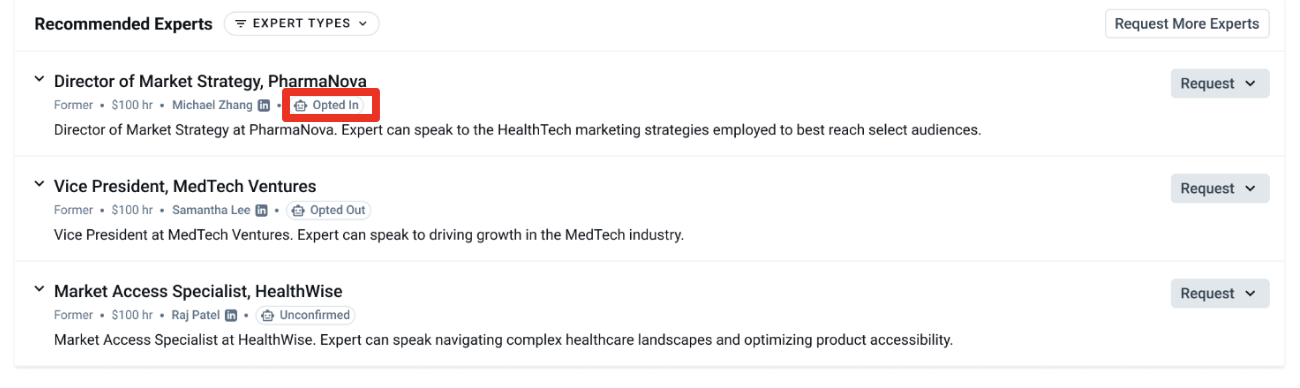
Each expert will display a status indicating AI participation:
- Opted in: the expert has agreed to participate in AI-led interviews
- Opted out: the expert prefers not to engage with an AI interviewer
- Unconfirmed: the expert has not yet indicated a preference
Option 2: Select from Expert Recommendation Emails
In addition to all recommended experts being available in your Call Portal, you will also receive an email when new recommended experts are available.
- Use the embedded option to request an AI-Interviewer.
- This allows you to move directly from recommendation → request without returning to the platform.
Best for: Quickly actioning recommendations without returning to the platform.
Option 3: Request directly to your Client Research Manager (CRM)
If you prefer to manage your workflow via email or phone, reach out to your Client Research Manager and let them know you’d like to set up an AI-Led Expert Call or use the AI Interviewer for some or all of your calls for a specific project.
Once your AI-Led expert call takes place, you will receive :
Key Takeaways - a structured summary automatically generated from the verified transcript, organized around your project goal and key questions.
- This is delivered alongside the transcript both in-platform (in the doc reader, above the transcript content) and in the transcript email PDF, so every team member on the project receives it regardless of how they access the call.
- Key takeaways are scoped exclusively to your team. They reflect your research agenda and are never surfaced in the broader transcript library.
- Key takeaways are available for both AI-led and human-led expert calls.
- If you and the expert both speak the same non-English language, you can run the call in that language. Post-call transcript translation to English is now included at no additional cost.
- You'll still receive the instant transcript in the original language alongside the free English translation.
- Live, real-time translation during the call itself remains a paid add-on and is separate from this free post-call translation.
For clients with access to the full AlphaSense platform, you’ll have access to analyze all your call project transcripts within Workspaces (see below).
Option 4: Request from a Transcript ("Talk to this Expert")
You can now request the AI Interviewer directly from any expert transcript using the "Talk to this Expert" button. Best for: Acting on an expert immediately while reviewing their transcript, without navigating back to the Call Portal.
To get started:
- In Document Search, filter your results to Expert Insights and select a transcript.
- Click Talk to this Expert.
- Choose who will conduct the call: AI Interviewer or My Team.
- Add the request to an existing Call Project, or create a new Call Project to get started.
Note: Compliance routing and opted-out expert flags are built in. Users not approved for AI-Led calls are automatically directed to the human-led path with in-context messaging.
Option 5: Browse Experts on a Company Profile
You can now browse and request relevant experts directly from a Company Profile page while you research a company. Select the "Expert Insights" quick filter, and the page widgets will update to show:
- A curated "Experts" table on the Expert Insights launchpad, showing experts relevant to the company you're viewing.
- Each expert's relationship to the company (former employee, customer, partner, or competitor), title, interview history, hourly rate, and recent activity.
- A direct option to request a call from the table.
Best for: Discovering and requesting the right expert without leaving the company you're already researching.
Analyze Call Transcripts
In Workspaces
Once calls are completed, transcripts are available for reference and analysis via your Call Portal. When you open a transcript in the doc reader, you will see your tailored takeaway displayed above the transcript content, a structured summary organized around your project's goals and key questions.
From there, you can then move the transcripts into a Workspace to leverage Generative Search, ask questions, and synthesize insights. Only call-taking clients with access to the full AlphaSense platform will be able to analyze their calls within workspaces.
Note: You will also receive an email notification alerting that your transcript is ready.
From the Call Projects page:
- Select Analyze in Workspace
- Choose to:
- Create a new Workspace, or
- Add transcripts to an existing Workspace
Workspaces allow you to centralize expert insights and analyze them alongside other AlphaSense content.
After adding transcripts to a Workspace, you can:
- Run Generative Search across all transcripts
- Ask questions, summarize themes, and extract key insights
- Compare perspectives across multiple experts
- Identify patterns, consensus, and outliers
- Generate structured outputs
- Use findings in reports, investment memos, or strategy documents
From the Call Project Page
The Completed Calls section of your Call Project page now displays key information about each interviewed expert.
- The collapsed view shows the call date, expert type, title, and a View Transcript button.
- Expanding a record reveals the call taker (or "AI Interviewer" for AI-Led calls), expert name, rate, expert bio, and screening questions and answers.
- Clicking View Transcript opens a focused document viewer scoped to completed calls from that specific project.
Call Project Reports
Call Project Reports turn every transcript in a call project into one investor-ready output. The report is AI-generated and updates automatically as your team completes new interviews in the project.
Each report includes:
- Answers to your pre-screening questions across every interview
- Thematic key takeaways pulled across the full project
- Bull and bear quote groupings
- Directional quantitative framing
- Evidence snippets with citations linking back to the source transcript
- Project overview metadata, including expert roles, interview dates, and perspectives represented
Any user with a call project set up through Expert Call Services can view the report for that project.